
AlmaLinux 10: dnf-automatic ships four timers and only downloads by default
Test scope
Section titled “Test scope”An AlmaLinux 10.2 Server VM with dnf-automatic-4.20.0-22.el10_2.alma.1 (EL10 still ships dnf 4.x).
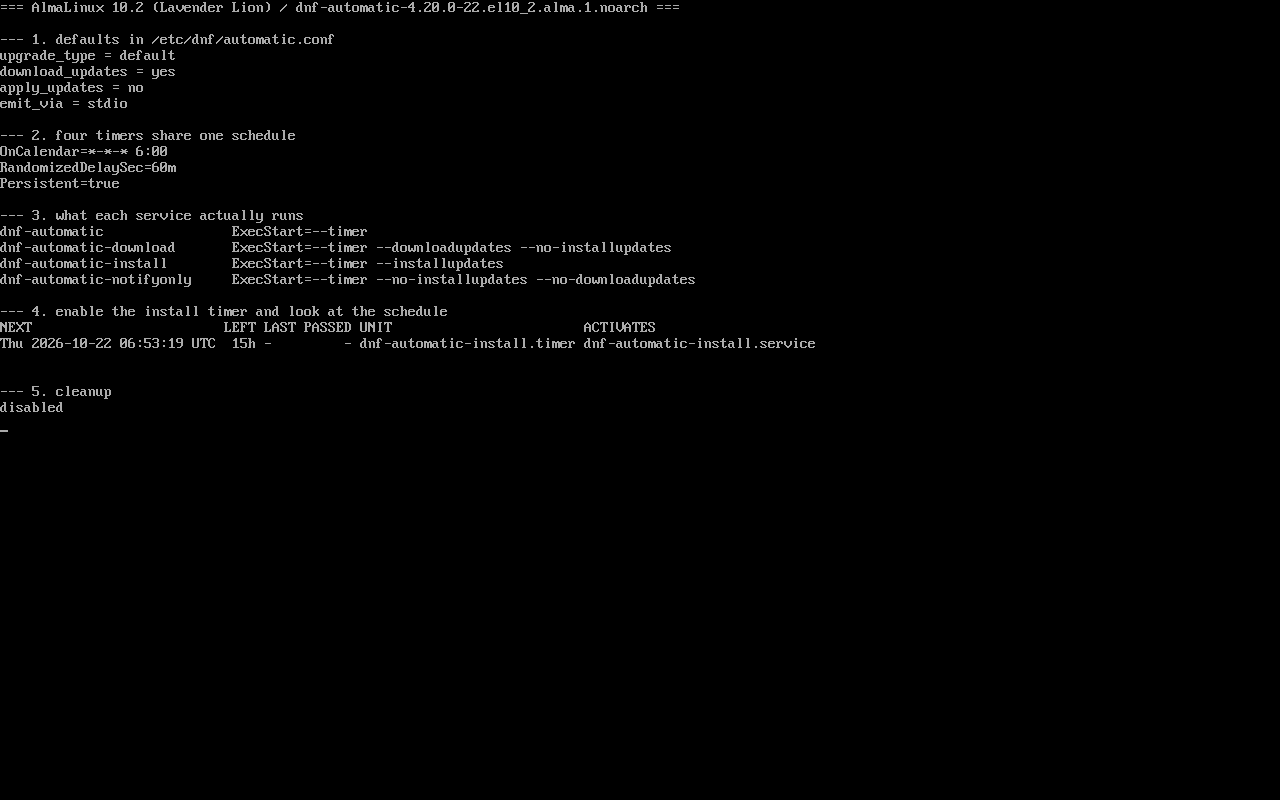
Checked in order: config defaults, the four timers’ schedule, the four ExecStart lines, enabling one timer to see the next run, then disabling it. Screenshot: public/evidence/dnf-automatic/alma-timers.png.
Defaults: download, do not install
Section titled “Defaults: download, do not install”$ grep -E "^(apply_updates|download_updates|upgrade_type|emit_via)" /etc/dnf/automatic.confupgrade_type = defaultdownload_updates = yesapply_updates = noemit_via = stdioapply_updates = no is the key: the generic timer downloads packages into the cache and stops there. Most “I configured automatic updates and nothing happened” reports end here.
Four timers, one schedule
Section titled “Four timers, one schedule”$ grep -h -E "^(OnCalendar|RandomizedDelaySec|Persistent)" /usr/lib/systemd/system/dnf-automatic.timerOnCalendar=*-*-* 6:00RandomizedDelaySec=60mPersistent=trueAll four timers (dnf-automatic, -download, -install, -notifyonly) carry identical values:
| Field | Meaning |
|---|---|
OnCalendar=*-*-* 6:00 | fire daily at 06:00 |
RandomizedDelaySec=60m | spread runs over the following hour |
Persistent=true | catch up after being powered off |
Only ExecStart differs
Section titled “Only ExecStart differs”dnf-automatic --timerdnf-automatic-download --timer --downloadupdates --no-installupdatesdnf-automatic-install --timer --installupdatesdnf-automatic-notifyonly --timer --installupdates --no-downloadupdates- generic
dnf-automatic.timer: follows the config (download only by default); - download: force download, never install, even if
apply_updates=yes; - install: force installation, requires working repositories;
- notifyonly: report only, no download, no install.
Enable one and read the schedule
Section titled “Enable one and read the schedule”$ systemctl enable --now dnf-automatic-install.timer$ systemctl list-timers 'dnf-automatic*' --no-pager | head -3NEXT LEFT LAST PASSED UNITThu 2026-10-22 06:53:19 UTC 15h - - dnf-automatic-install.timer dnf-automatic-install.serviceThe next run is 06:53, not 06:00 — that is the 60-minute random delay landing at +53. A non-round time is not a misconfiguration.
Switching to security-only updates
Section titled “Switching to security-only updates”# sed -i 's/^upgrade_type = default/upgrade_type = security/' /etc/dnf/automatic.conf# sed -i 's/^apply_updates = no/apply_updates = yes/' /etc/dnf/automatic.conf# systemctl enable --now dnf-automatic-install.timerBoth changes are required: upgrade_type sets the scope (security / default / minimal), apply_updates decides whether packages land. Changing only the first keeps the host on download-only.
A staged rollout — notifyonly, then download, then install — is safer than starting with install.
Making notifications actually leave the host
Section titled “Making notifications actually leave the host”notifyonly only hands a result to an emitter; whether mail leaves the host depends on local SMTP, not on the timer. Start from the default:
$ grep -E "^emit_via" /etc/dnf/automatic.confemit_via = stdiostdio writes to the journal only. After switching to email, the [email] block supplies the mail parameters:
email_from = [email protected]email_to = rootemail_host = localhostemail_port = 25email_tls = noA minimal Server host has none of that available:
$ command -v sendmail(no output)$ ss -ltn | grep -c ':25 '0To send mail you must add an MTA: install postfix (or any local SMTP), point email_host at a real server, match email_port to what it listens on, and enable email_tls when authentication is required.
Do not wait for 06:00 — validate the chain manually:
$ dnf-automatic /etc/dnf/automatic.conf --timerWhen delivery fails, emit_via = email writes nothing to stdout; the journal is the only place to look.
Common traps
Section titled “Common traps”- Enabling without understanding the pair: the timer triggers, the service and config decide the effect;
- Two timers at once: overlapping runs contend for the dnf lock;
- Offline hosts:
apply_updates=yesstill cannot install; the journal shows unreachable repositories; - Where the logs are:
journalctl -u dnf-automatic-install.service -n 50.
Practice: notify, then download, then install
Section titled “Practice: notify, then download, then install”sudo dnf install -y dnf-automaticsudo systemctl enable --now dnf-automatic-notifyonly.timersudo systemctl list-timers 'dnf-automatic*' --no-pagersudo systemctl disable --now dnf-automatic-notifyonly.timerChecks:
list-timersshows a next run with the random delay applied;systemctl cat dnf-automatic-notifyonly.servicecontains--no-downloadupdates;- Switching to
-downloadkeeps the same schedule; - Disable it afterwards so the lab host does not change itself.
常见问题
Why did my host never install updates?
Check apply_updates first, then which timer is enabled — the generic timer follows the config, and the config defaults to download-only.
Can the random delay be removed?
Yes by overriding RandomizedDelaySec, but keeping it avoids hammering mirrors at the same second.
Does it handle kernel reboots?
No. dnf-automatic installs packages; whether a new kernel takes effect depends on rebooting or live patching.
Next steps
Section titled “Next steps”- Repositories: /en/repos/
- Transaction rollback: /en/dnf-history-rollback/
- Reboot policy: /en/reboot-policy/