
AlmaLinux 10: systemd-resolved foreign vs stub mode
Test scope
Section titled “Test scope”An AlmaLinux 10.2 VM in PVE, minimal install, systemd-resolved-257-23.el10_2.1.alma.1 installed offline from the Alma 10.2 DVD BaseOS tree (the lab network has no default route, so no public mirrors).
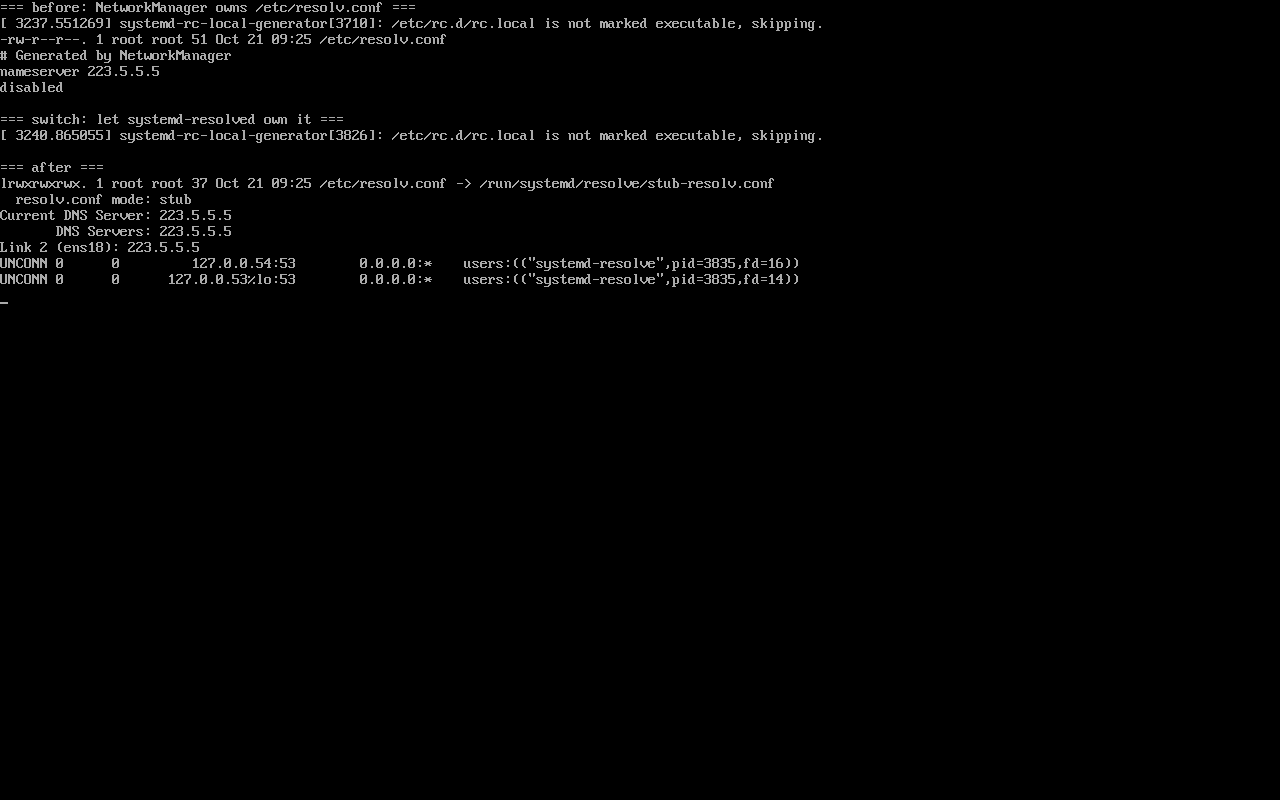
Verified in order: before install → enabled only → after hand-over → rollback. Screenshot: public/evidence/systemd-resolved/alma-foreign-to-stub.png.
Three facts before installing
Section titled “Three facts before installing”$ rpm -q systemd-resolvedpackage systemd-resolved is not installed$ ls -l /etc/resolv.conf-rw-r--r--. 1 root root 51 ... /etc/resolv.conf$ head -2 /etc/resolv.conf# Generated by NetworkManagernameserver 223.5.5.5The third one is easy to miss: ss -lnup | grep :53 prints nothing — nothing on the host listens for DNS. Resolution depends entirely on the upstream address NetworkManager wrote.
Enabling is not taking over
Section titled “Enabling is not taking over”# systemctl enable --now systemd-resolved# resolvectl --no-pager status | grep "resolv.conf mode" resolv.conf mode: foreignforeign is resolved’s verdict on /etc/resolv.conf: someone else writes it. The service runs, queries bypass it. “Installed it and nothing changed” is therefore expected, not a bug.
One line tells you which stage you are in:
resolv.conf mode | Meaning |
|---|---|
foreign | maintained by NetworkManager or by hand; resolved only watches |
stub | points at /run/systemd/resolve/stub-resolv.conf; queries hit 127.0.0.53 |
static | a static copy at /run/systemd/resolve/resolv.conf |
Two conditions for the hand-over
Section titled “Two conditions for the hand-over”# printf '[main]\ndns=none\n' > /etc/NetworkManager/conf.d/90-dns-none.conf# ln -sf /run/systemd/resolve/stub-resolv.conf /etc/resolv.conf# systemctl restart NetworkManager systemd-resolved- Condition one: NetworkManager must stop writing the file (
dns=none), otherwise the next network event overwrites it; - Condition two:
/etc/resolv.confmust be a symlink to the stub file, not a plain file with identical content.
Afterwards:
$ resolvectl --no-pager status | grep -E "mode|Current DNS" resolv.conf mode: stub Current DNS Server: 223.5.5.5$ ss -lnup | grep ":53 "UNCONN ... 127.0.0.54:53 ... ("systemd-resolve")UNCONN ... 127.0.0.53%lo:53 ... ("systemd-resolve")Two listeners, two purposes: 127.0.0.53 is the local stub for applications, 127.0.0.54 serves forwarding and container-facing queries.
When to leave it alone
Section titled “When to leave it alone”- You only need names to resolve — keep the current setup and skip the extra hop;
- Monitoring or firewall rules depend on direct upstream queries — switching to 127.0.0.53 changes what those rules see;
- You want split DNS without systemd-networkd —
dns=noneis all-or-nothing.
Rollback order matters
Section titled “Rollback order matters”Remove config, then the symlink, then the service. Reversed order leaves /etc/resolv.conf pointing at a file that no longer exists:
# rm -f /etc/NetworkManager/conf.d/90-dns-none.conf# rm -f /etc/resolv.conf# systemctl disable --now systemd-resolved# systemctl restart NetworkManagerCommon traps
Section titled “Common traps”- Judging by file contents: a plain file containing
nameserver 127.0.0.53is stillforeign; check the symlink and the mode; - Forgetting to restart NetworkManager after writing
dns=none; - Mistaking
No route to hostfor a DNS failure: our offline lab produced exactly that;ip routeexplains it; - Half a rollback: resolver stopped while the symlink remains.
Practice: identify your mode
Section titled “Practice: identify your mode”ls -l /etc/resolv.confresolvectl --no-pager status | grep "resolv.conf mode"ss -lnup | grep ":53 " || echo "no local resolver"Checks:
- Symlink to
stub-resolv.confplus modestubmeans the hand-over is complete; - Plain file plus
foreignmeans installed but not in use; - No listener on
:53means resolved is not running or the stub is disabled; - All three must agree, otherwise the change is only half applied.
常见问题
Why is systemd-resolved not part of a minimal install?
EL10 lets NetworkManager manage DNS directly, which suits servers; resolved ships as an optional component in the repositories.
How do I install it offline?
The RPM sits under BaseOS on the DVD; `dnf --disablerepo=* install ./file.rpm` works because its only dependencies are matching systemd packages.
Does stub mode break containers?
It can: container resolv.conf often points at 127.0.0.53, which may be unreachable inside the namespace. Point containers at an explicit upstream or use 127.0.0.54.
Next steps
Section titled “Next steps”- journald: /en/journald-logging/
- Bonding and VLAN: Bonding and VLAN
- Post-install checks: 7 checks after install