
AlmaLinux 10: where journald logs go, and how to keep them
Test scope
Section titled “Test scope”Measured on a PVE AlmaLinux 10.2 VM, minimal install (349 packages), systemd 257-23.el10_2.1.alma.1:
- the out-of-the-box state (no config override, no journal directory);
- the state after creating the directory and rebooting;
- real
journalctlfilter and--vacuum-sizeoutput.
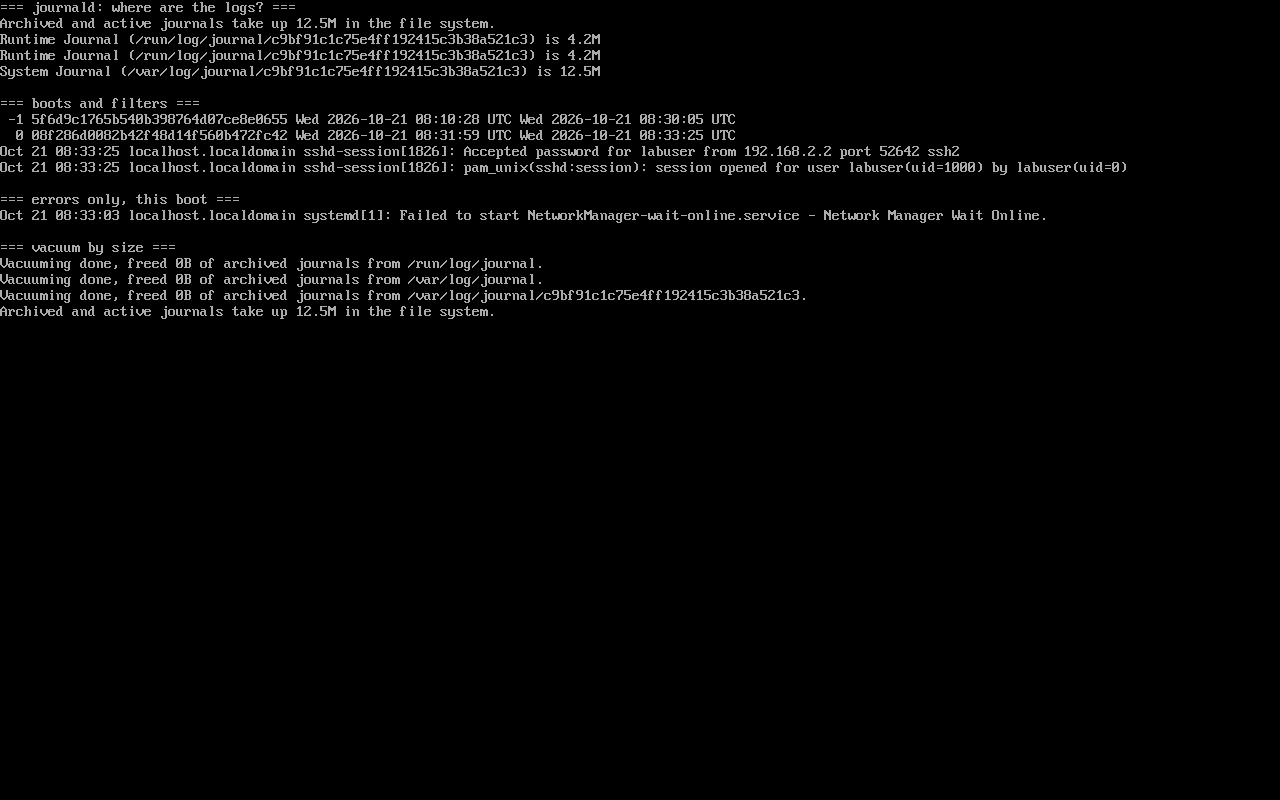
Evidence: public/evidence/journald/alma-journalctl.png.
Default state: logs live in memory
Section titled “Default state: logs live in memory”Right after a minimal install:
$ ls /etc/systemd/journald.confls: cannot access '/etc/systemd/journald.conf': No such file or directory
$ systemd-analyze cat-config systemd/journald.conf | grep -E '^#?Storage'#Storage=auto
$ ls -d /var/log/journalls: cannot access '/var/log/journal': No such file or directory
$ journalctl --disk-usageArchived and active journals take up 5.6M in the file system.
Storage=auto means “persist if /var/log/journal exists, otherwise stay volatile”. That 5.6M sits in /run/log/journal and disappears on reboot.
The only shipped config is /usr/lib/systemd/journald.conf (all comments); nothing overrides it under /etc.
Make it persist: directory plus reboot
Section titled “Make it persist: directory plus reboot”# mkdir -p /var/log/journal# systemctl rebootAfter the reboot, journald reports its own storage:
$ journalctl -u systemd-journald -b --no-pager | grep JournalSystem Journal (/var/log/journal/c9bf91c1c75e4ff192415c3b38a521c3) is 12.5M, max 894.4M, 881.9M free.journald also fixes up ownership and ACLs:
drwxr-sr-x+ 2 root systemd-journal ... c9bf91c1c75e4ff192415c3b38a521c3max 894.4M is the default: with no SystemMaxUse, journald takes 10% of the filesystem (8.8G here).
A restart is not enough
Section titled “A restart is not enough”Blunt result: on this EL10 image, writing Storage=persistent and running systemctl restart systemd-journald did not switch storage — three attempts, plus a variant that removed /run/log/journal, all still logged Runtime Journal (/run/log/journal/...) while /var/log/journal stayed empty. Using /etc/systemd/journald.conf instead of a drop-in made no difference.
What worked was creating the directory and rebooting. If a reboot is not possible, the drop-in still guarantees the switch on next boot.
This is a measurement, not documentation. The systemd docs define
Storage=semantics but never promise that a restart relocates existing storage; trust your own output over any tutorial.
Querying: unit, boot, priority
Section titled “Querying: unit, boot, priority”$ journalctl --list-boots --no-pager | tail -2-1 5f6d9c1765b540b398764d07ce8e0655 ... Wed 2026-10-21 08:30:05 UTC 0 00f206a0002b42f40d14f560b472fc42 ... Wed 2026-10-21 08:33:25 UTC
$ journalctl -u sshd -n 2 --no-pager --output=shortOct 21 08:33:25 localhost.localdomain sshd-session[18261]: Accepted password for labuser from 192.168.2.2 port 52642 ssh2
$ journalctl -p err -b --no-pager | tail -1Oct 21 08:33:03 localhost.localdomain systemd[1]: Failed to start NetworkManager-wait-online.service - Network Manager Wait Online.Three axes cover most debugging: -u for a unit, -b for the current boot, -p err for severity.
Reclaiming space: vacuum
Section titled “Reclaiming space: vacuum”$ journalctl --vacuum-size=2MVacuuming done, freed 0B of archived journals from /run/log/journal.Vacuuming done, freed 0B of archived journals from /var/log/journal/c9bf91c1c75e4ff192415c3b38a521c3.Two details matter: vacuum prints one line per directory, and the active system.journal is never removed, so freed 0B is a normal outcome rather than a failed command.
Common traps
Section titled “Common traps”- Assuming logs are persistent because
journalctlshows history — that history may only cover the current boot; - Setting
Storage=persistentwithout creating/var/log/journal; - Looking for
/etc/systemd/journald.confand concluding journald is unconfigured — the packaged file lives in/usr/lib; - Deleting files with
rminstead ofjournalctl --vacuum-*.
Practice: watch the switch
Section titled “Practice: watch the switch”journalctl --disk-usagels -d /var/log/journal 2>&1sudo mkdir -p /var/log/journalsudo systemctl rebootjournalctl -u systemd-journald -b | grep "System Journal"Checks:
- Before the reboot the directory does not exist;
- After it, journald logs a
System Journalline; - Pre-reboot entries are still queryable;
--disk-usagenow covers the persistent directory.
常见问题
Why does my AlmaLinux have /etc/systemd/journald.conf?
Server-class or upgraded systems may ship one; a minimal install (349 packages) does not. Check both locations — /etc overrides /usr/lib.
Can I switch without rebooting?
Not in our measurements. If you cannot reboot, forward logs to rsyslog or a remote collector and switch at the next maintenance window.
How does this relate to /var/log/messages?
EL10 Server still ships rsyslog writing text logs; it is independent of journald and rotates with logrotate.
Next steps
Section titled “Next steps”- Text log rotation: /en/log-rotation/
- Repositories and packages: /en/repos/
- Boot troubleshooting: Boot and startup troubleshooting