
AlmaLinux 10: what quadlet actually generates from a .container file
Test scope
Section titled “Test scope”An AlmaLinux 10.2 Server VM with podman 5.8.2 and the quadlet generator 5.8.2.
The lab has no registry access, so the image was built locally with podman import from bash plus its libraries (about 6 MB, tagged localhost/labshell:1). That also proves quadlet itself needs no network — only Image= must resolve.
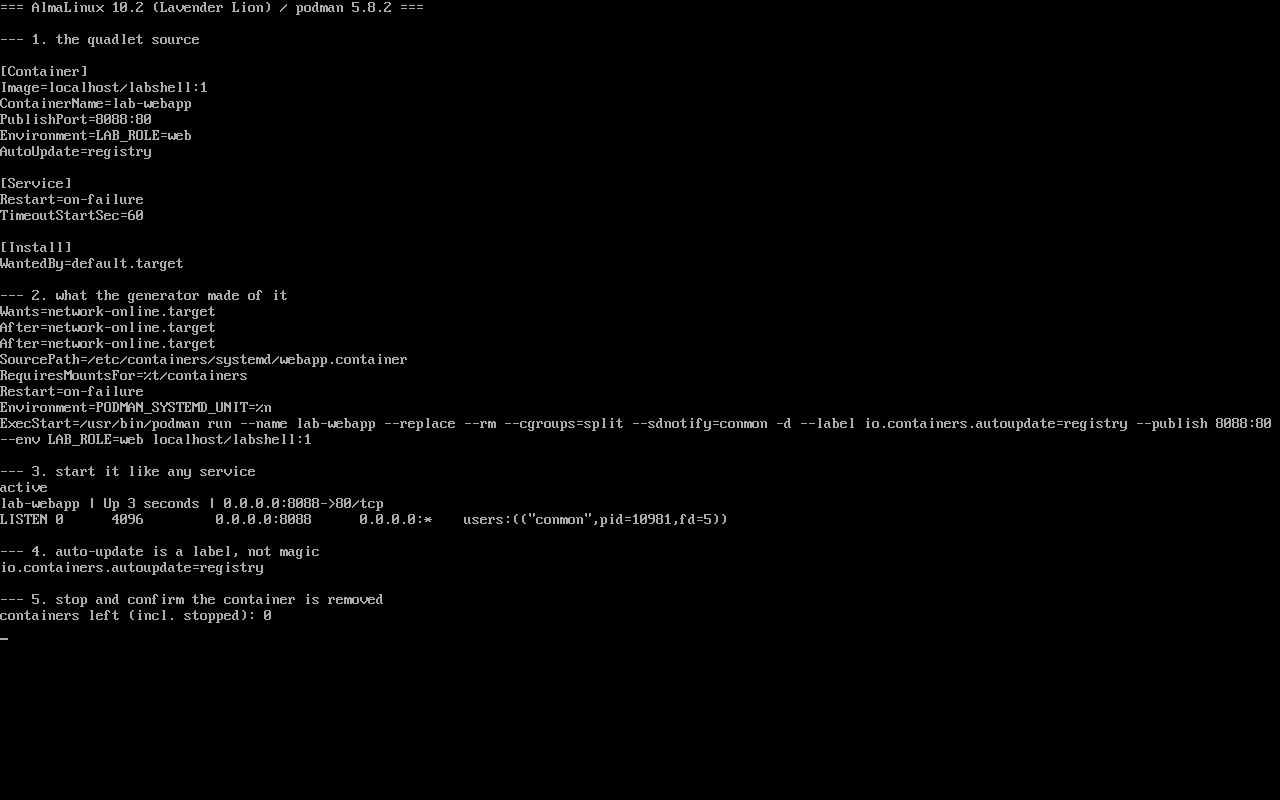
Screenshot: public/evidence/quadlet/alma-quadlet.png.
Starting point
Section titled “Starting point”[Container]Image=localhost/labshell:1ContainerName=lab-webappPublishPort=8088:80Environment=LAB_ROLE=webAutoUpdate=registry
[Service]Restart=on-failureTimeoutStartSec=60
[Install]WantedBy=default.targetThe filename decides the unit name: webapp.container becomes webapp.service.
The generator turns it into one podman run
Section titled “The generator turns it into one podman run”$ systemctl cat webapp.serviceWants=network-online.targetAfter=network-online.targetSourcePath=/etc/containers/systemd/webapp.containerRequiresMountsFor=%t/containers
ExecStart=/usr/bin/podman run --name lab-webapp --replace --rm \ --cgroups=split --sdnotify=conmon -d \ --label io.containers.autoupdate=registry \ --publish 8088:80 --env LAB_ROLE=web localhost/labshell:1Field by field:
| You wrote | Generated |
|---|---|
ContainerName=lab-webapp | --name lab-webapp |
PublishPort=8088:80 | --publish 8088:80 |
Environment=LAB_ROLE=web | --env LAB_ROLE=web |
AutoUpdate=registry | --label io.containers.autoupdate=registry |
[Service] Restart=on-failure | the unit’s Restart=on-failure |
| (implicit) | --replace --rm --cgroups=split --sdnotify=conmon -d |
--replace --rm explains the lifecycle: a same-named container is replaced, and stopping the service deletes the container. After systemctl stop, podman ps -a returned 0 entries.
Running it
Section titled “Running it”$ systemctl start webapp.service$ systemctl is-active webapp.serviceactive$ podman ps --format '{{.Names}} | {{.Status}} | {{.Ports}}'lab-webapp | Up 3 seconds | 0.0.0.0:8088->80/tcp$ ss -tlnp | grep 8088LISTEN 0 4096 0.0.0.0:8088 0.0.0.0:* users:(("conmon",pid=10981,fd=5))The listener is conmon, not your application — worth remembering when a port is open but the app is not answering.
AutoUpdate is a label, not a switch
Section titled “AutoUpdate is a label, not a switch”$ podman inspect lab-webapp --format '{{index .Config.Labels "io.containers.autoupdate"}}'registryUpdating is performed by podman-auto-update.timer (or a manual podman auto-update). So:
AutoUpdate=registryalone pulls nothing;- enable
podman-auto-update.timerfor periodic updates; - the container must be podman-managed (it has the label) and the registry must be reachable.
Enablement and dependencies
Section titled “Enablement and dependencies”[Install]WantedBy=default.targetWithout [Install] the unit cannot be enabled. With it, systemctl enable webapp.service works. The generator also adds:
Wants=network-online.targetAfter=network-online.targetRequiresMountsFor=%t/containersThe first pair waits for networking before pulling; the mount requirement waits for container storage.
Common traps
Section titled “Common traps”- Editing
.containerwithoutdaemon-reload: the generator does not re-run, so nothing changes; - Renaming the container while the old one exists:
--replaceonly applies at start; - Expecting container-layer data to survive a restart:
--rmdeletes the container on stop; - Using
multi-user.target“for tradition”: quadlet expectsdefault.target.
Practice: convert a podman run into a quadlet
Section titled “Practice: convert a podman run into a quadlet”sudo podman run -d --name demo -p 8089:80 --env A=1 localhost/labshell:1sudo tee /etc/containers/systemd/demo.container >/dev/null <<'EOF'[Container]Image=localhost/labshell:1ContainerName=demoPublishPort=8089:80Environment=A=1[Install]WantedBy=default.targetEOFsudo systemctl daemon-reloadsudo systemctl start demo.servicesystemctl is-active demo.servicesudo podman ps --format '{{.Names}} {{.Ports}}'sudo systemctl stop demo.serviceChecks:
- A hand-run container is not managed by systemd; remove it to avoid a name clash;
systemctl cat demo.serviceshows the matchingpodman runflags;- The published port matches the
.containerfile; - Stopping the service removes the container.
常见问题
quadlet or podman-compose?
For a few long-running services on one host, quadlet gives native systemd ordering, enable-on-boot and journald logs. Compose suits local development and multi-container prototypes.
Why does editing the file do nothing?
quadlet is a systemd generator; only daemon-reload regenerates the unit.
Where are the container logs?
journalctl -u webapp.service — podman forwards container stdout to journald unless you change the log driver.
Next steps
Section titled “Next steps”- Containers: /en/containers/
- Journal and persistence: /en/journald-logging/
- Services: /en/ops-monitoring/