
AlmaLinux 10: which firewalld zone wins, and why the source zone did not apply
Test scope
Section titled “Test scope”An AlmaLinux 10.2 Server VM with firewalld 2.4.0; ens18 is managed by NetworkManager.
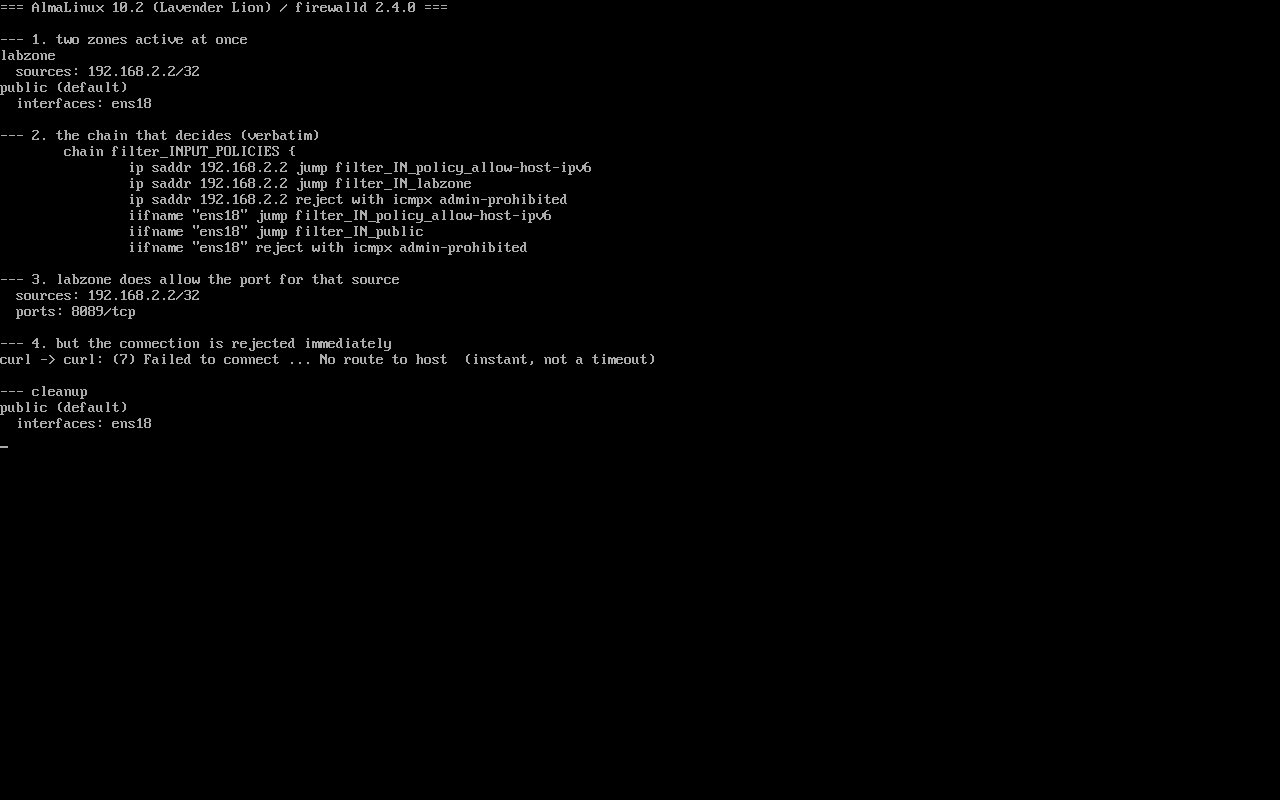
Method: create a source-matched zone (source 192.168.2.2/32, port 8089/tcp allowed), then connect from 192.168.2.2 and observe the result; inspect the real match chain with nft list chain inet firewalld filter_INPUT_POLICIES. Screenshot: public/evidence/firewalld/alma-zone-match.png.
Two zones can be active at once
Section titled “Two zones can be active at once”$ firewall-cmd --get-active-zoneslabzone sources: 192.168.2.2/32public (default) interfaces: ens18One matches by source, the other by interface. Seeing both in the active list is normal — and it does not mean their rules are merged.
The kernel chain is the answer
Section titled “The kernel chain is the answer”$ nft list chain inet firewalld filter_INPUT_POLICIESchain filter_INPUT_POLICIES { ip saddr 192.168.2.2 jump filter_IN_policy_allow-host-ipv6 ip saddr 192.168.2.2 jump filter_IN_labzone ip saddr 192.168.2.2 reject with icmpx admin-prohibited iifname "ens18" jump filter_IN_policy_allow-host-ipv6 iifname "ens18" jump filter_IN_public iifname "ens18" reject with icmpx admin-prohibited}Each segment (source, then interface) ends with its own reject. Only the segment that actually matches decides the outcome.
Measured: allowed in the zone, still rejected
Section titled “Measured: allowed in the zone, still rejected”$ firewall-cmd --zone=labzone --list-all | grep -E "^ (sources|ports)" sources: 192.168.2.2/32 ports: 8089/tcp$ curl -v --max-time 6 http://192.168.2.241:8089/* connect ... failed: No route to hostcurl: (7) Failed to connect ... No route to hostThe failure returns in 0 ms — that is a REJECT (ICMP admin-prohibited), not a broken link and not a timeout. A host in no zone at all (192.168.2.240) fails the same way.
Interface zone membership belongs to NetworkManager
Section titled “Interface zone membership belongs to NetworkManager”$ firewall-cmd --permanent --zone=public --remove-interface=ens18The interface is under control of NetworkManager, setting zone to default.$ firewall-cmd --reload && firewall-cmd --get-active-zonespublic (default) interfaces: ens18With NM in control, --remove-interface does not stick: the zone is a connection property that NM writes back on reload.
What to do instead
Section titled “What to do instead”① Bind the connection to the target zone
sudo nmcli connection modify lab-static connection.zone labzonesudo nmcli connection up lab-staticfirewall-cmd --get-active-zones # ens18 must appear under labzone② Or use a firewalld policy (2.x): policies combine ingress/egress zones and sources without fighting interface ownership.
③ Always verify against the chain, not the docs
nft list chain inet firewalld filter_INPUT_POLICIESCommon traps
Section titled “Common traps”- Assuming rules from both zones apply: the first matching segment wins;
- Treating
No route to hostas a network fault: 0 ms means REJECT; - Adding
--add-sourceonly: without moving the interface, the source zone may never see the traffic; - Not re-checking after reload: NM restores the default zone.
Practice: find out which zone handles the traffic
Section titled “Practice: find out which zone handles the traffic”firewall-cmd --get-active-zonesnmcli -g connection.zone connection show lab-staticsudo firewall-cmd --permanent --new-zone=probesudo firewall-cmd --permanent --zone=probe --add-port=8089/tcpsudo firewall-cmd --reloadnft list chain inet firewalld filter_INPUT_POLICIESsudo firewall-cmd --permanent --delete-zone=probesudo firewall-cmd --reloadChecks:
- Which zone lists the interface;
- Whether
nmclireports the same zone (NM wins when they differ); - The
iifname "ens18"jump and reject lines in the chain; - After cleanup only
publicremains active.
常见问题
Do source zones or interface zones win?
Do not memorise a rule — read nft list chain inet firewalld filter_INPUT_POLICIES on the host; the order and the position of the reject lines decide.
Why reload after changing the nmcli zone?
nmcli triggers a firewalld reload; running firewall-cmd --reload and re-checking --get-active-zones is the safe habit.
Can rich rules bypass this?
Rich rules belong to a zone and are still subject to zone matching; for cross-zone control use policies.
Next steps
Section titled “Next steps”- Zones: /en/firewalld-zones/
- Rich rules: /en/firewalld-rich-rules/
- Direct rules and policies: /en/firewalld-direct-rules/