
AlmaLinux 10: why iptables -L shows nothing from firewalld
Test scope
Section titled “Test scope”An AlmaLinux 10.2 VM (minimal install) with:
| Component | Version |
|---|---|
| firewalld | 2.4.0-1.el10_1 |
| nftables | 1.1.5-3.el10 |
| iptables-nft | 1.8.11-13.el10_1 |
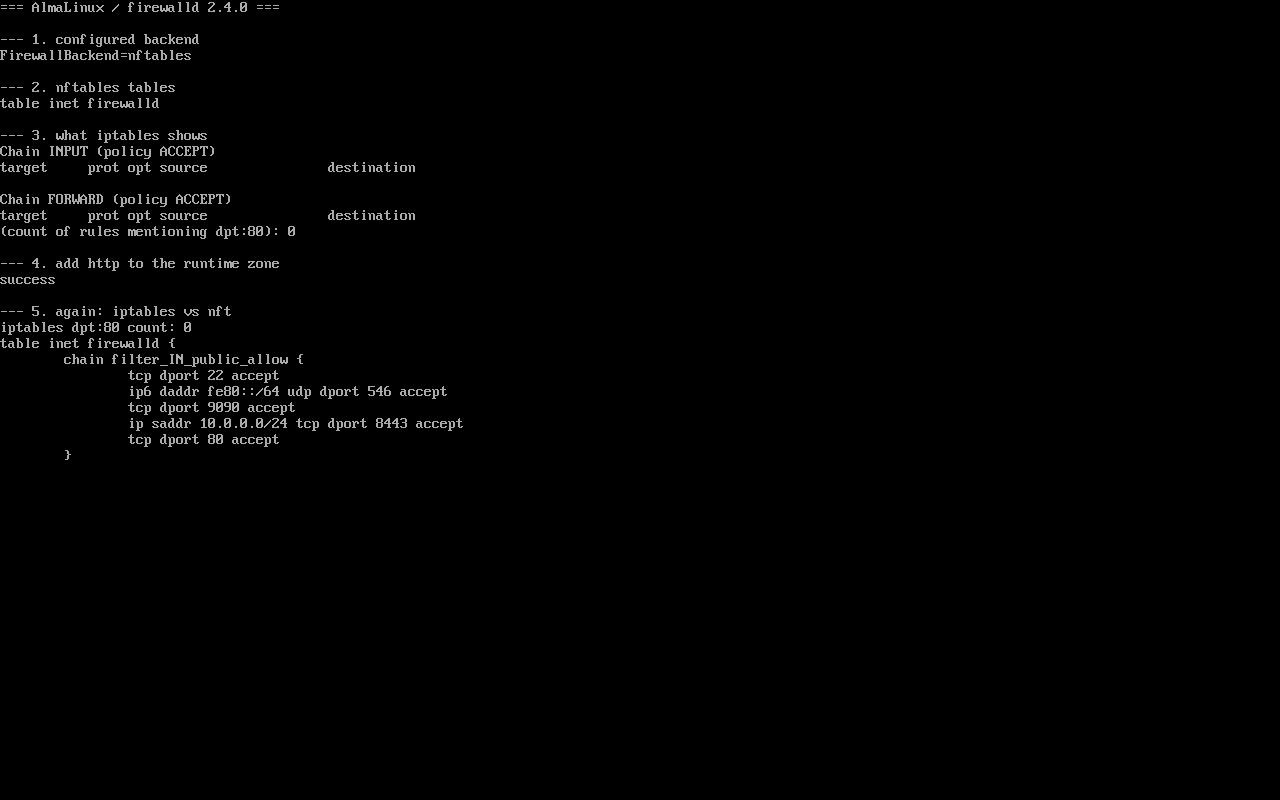
All output below comes from that host; screenshot in public/evidence/nftables/alma-iptables-vs-nft.png.
The backend is a configuration value
Section titled “The backend is a configuration value”$ grep -E "^FirewallBackend" /etc/firewalld/firewalld.confFirewallBackend=nftablesThe same file states the trade-off explicitly:
# Choices are:# - nftables (default)# - iptables (iptables, ip6tables, ebtables and ipset)# Note: The iptables backend is deprecated. It will be removed in a future release.So the legacy backend still exists on EL10 but is deprecated, and nftables is the default.
Two rule tables that never see each other
Section titled “Two rule tables that never see each other”firewalld writes into its own table:
$ nft list tablestable inet firewalldThe iptables command, in turn, is iptables-nft here (/usr/sbin/iptables is an alternatives symlink backed by the iptables-nft package) and only manipulates its own table ip filter:
$ iptables -nLChain INPUT (policy ACCEPT)target     prot opt source               destination
Chain FORWARD (policy ACCEPT)...
That emptiness is not a permission problem and not a stopped firewall — it is two separate write paths.
Allow a service and watch both sides
Section titled “Allow a service and watch both sides”$ firewall-cmd --add-service=httpsuccess
$ iptables -nL | grep -c 'dpt:80'0
$ nft list chain inet firewalld filter_IN_public_allow tcp dport 22 accept ip6 daddr fe80::/64 udp dport 546 accept tcp dport 9090 accept ip saddr 10.0.0.0/24 tcp dport 8443 accept tcp dport 80 acceptPort 80 appears only in nft. Any check that relies on iptables -L to confirm a firewalld rule will reach the wrong conclusion on EL10.
How to inspect properly
Section titled “How to inspect properly”| Goal | Command |
|---|---|
| What is allowed (start here) | firewall-cmd --list-all |
| Raw rules of one chain | nft list chain inet firewalld filter_IN_public_allow |
| All nft rules | nft list ruleset |
| Which zone an interface is in | firewall-cmd --get-active-zones |
firewall-cmd --list-all and the nft chain are two views of the same data: the first is readable, the second shows ordering and counters.
Where iptables still shows up
Section titled “Where iptables still shows up”- Legacy scripts such as
iptables -A INPUT -p tcp --dport 8080 -j ACCEPTstill run, but the rule lands in iptables-nft’s own table and survivesfirewall-cmd --reload— two overlapping rule sets that are painful to reason about; - Container runtimes (podman, docker) install their own nft tables, so
nft list tableslists several; - Some third-party security agents only speak iptables.
It works, but do not mix it with firewalld.
Common traps
Section titled “Common traps”- Empty iptables read as “no firewall”: check
firewall-cmd --statefirst; - Hand-written iptables rules to “bypass” firewalld: both tables are active and evaluation order is hard to predict;
- Surviving rules after a firewalld restart: they live outside the managed table;
- Switching
FirewallBackendback to iptables “for stability”: that backend is deprecated and will disappear.
Practice: prove the two tables are separate
Section titled “Practice: prove the two tables are separate”nft list tablessudo iptables -nL | head -5sudo firewall-cmd --add-service=httpsudo nft list chain inet firewalld filter_IN_public_allow | grep -c "dport 80"sudo iptables -nL | grep -c "dpt:80"sudo firewall-cmd --remove-service=httpChecks:
nft list tablesshows at leastinet firewalld;- After allowing http, nft matches
dport 80; - The iptables count stays 0;
- Removing the service leaves the host as it was.
常见问题
Can iptables and firewalld coexist?
Technically yes, in different tables, but debugging cost is high. Use one entry point — firewalld rich rules or direct rules cover most needs.
The nft output is hard to read, what now?
Start from firewall-cmd --list-all for the human-readable answer, then drill into the nft chain when you need ordering or counters.
Do --direct rules show up in iptables?
No. firewalld translates direct rules into the same inet firewalld table, so iptables -L still shows nothing.
Next steps
Section titled “Next steps”- Zones: /en/firewalld-zones/
- Rich rules: /en/firewalld-rich-rules/
- Offline installs: /en/offline-updates/