
AlmaLinux 10: rich rule conditions, logging and exact removal
Test scope
Section titled “Test scope”In an AlmaLinux 10.2 privileged container (firewalld 2.4.3, default bridge network isolated from the host): adding, listing and removing rich rules, including a deliberately wrong removal as a control case. Log: plans/content-expansion/evidence/logs/alma-firewalld-rich-rules.log (tested on AlmaLinux 10.2).
The container shares the host kernel (5.14) while firewalld/systemd are genuine EL10 userspace; kernel netfilter behaviour needs a real host.
When a rich rule is needed
Section titled “When a rich rule is needed”Three common needs: allow only a specific subnet, allow but log, and rate-limit the logging. A plain --add-port allows the port for the whole zone and cannot do source conditions or logging.
Condition-based allow: source + port
Section titled “Condition-based allow: source + port”R1='rule family="ipv4" source address="192.0.2.0/24" port port="8080" protocol="tcp" accept'sudo firewall-cmd --permanent --add-rich-rule="$R1"sudo firewall-cmd --reloadfirewall-cmd --list-rich-rulessuccesssuccessrule family="ipv4" source address="192.0.2.0/24" port port="8080" protocol="tcp" acceptLogging and rate limiting: log + limit
Section titled “Logging and rate limiting: log + limit”R2='rule family="ipv4" service name="ssh" log prefix="SSH-ACCESS: " level="notice" limit value="3/m" accept'sudo firewall-cmd --permanent --add-rich-rule="$R2"sudo firewall-cmd --reloadfirewall-cmd --list-rich-rulesWith both rules present, --list-rich-rules does not guarantee insertion order (on Rocky 10.2 the order was reversed), so remove by string, not by position. limit value="3/m" caps the logging rate only, not connection establishment.
Removal must be verbatim
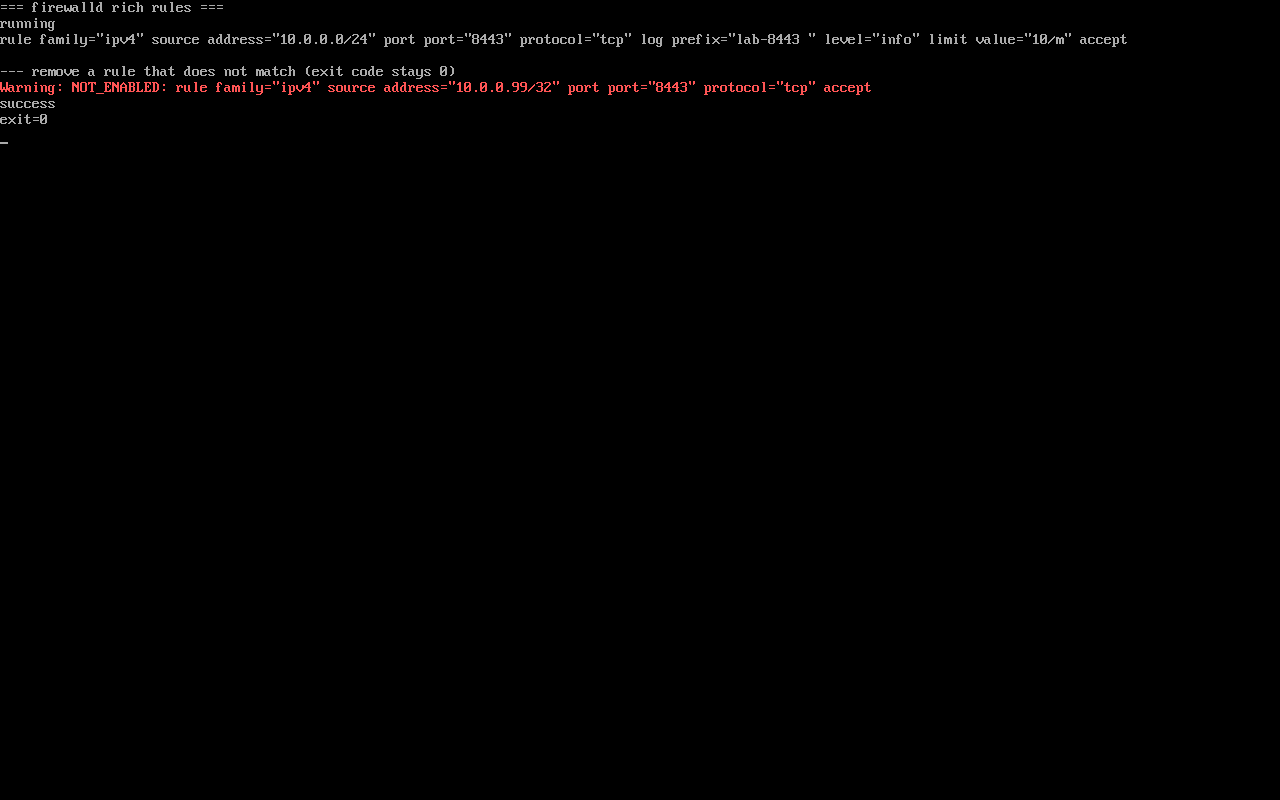
Section titled “Removal must be verbatim”sudo firewall-cmd --permanent --remove-rich-rule="$R1"sudo firewall-cmd --reloadfirewall-cmd --list-rich-rulesOnly R2 remains. Removal matches by rule content: a trailing extra space was tolerated in testing, but differing conditions remove nothing and print:
Warning: NOT_ENABLED: rule family="ipv4" source address="198.51.100.0/24" port port="9091" protocol="tcp" acceptsuccessThe exit code is still 0, so scripts must inspect the output rather than $? alone.
Relationship to ordinary allow rules
Section titled “Relationship to ordinary allow rules”Rich rules are evaluated before the zone’s service/port rules and a match stops the evaluation, therefore:
- “allow everything, but log one subnet”: put the rich rule first and the plain allow after it;
- “only this subnet”: do not also add
--add-port, or the plain allow widens it again.
Common traps
Section titled “Common traps”- Wrong rule still reports success: look for
Warning: NOT_ENABLEDin the output; - Runtime-only change: without
--permanentit disappears on restart; - No log visible: firewalld logs go to the journal; check
journalctl -u firewalldordmesg.
Practice: allow only 10.0.0.0/24 to 8443, with logging
Section titled “Practice: allow only 10.0.0.0/24 to 8443, with logging”R='rule family="ipv4" source address="10.0.0.0/24" port port="8443" protocol="tcp" log prefix="LAB-8443: " level="info" limit value="5/m" accept'sudo firewall-cmd --permanent --add-rich-rule="$R"sudo firewall-cmd --reloadfirewall-cmd --list-rich-rulessudo firewall-cmd --permanent --remove-rich-rule="$R"sudo firewall-cmd --reloadfirewall-cmd --list-rich-rulesChecks:
- The rule appears with its log prefix
journalctl -u firewalld --no-pager | tailshows the reload- After removal the list is empty
- Removing with a changed port prints
Warning: NOT_ENABLEDand leaves the rule in place
常见问题
Can a rich rule carry both source and destination?
Yes, one rule may include source/destination plus port or service, but more conditions make it harder to maintain; prefer several clear rules.
Where do the logs go?
firewalld log rules emit through the kernel log, usually visible in journalctl -u firewalld or dmesg; grep for your prefix to filter.
Is the syntax the same on EL9 and EL10?
Rich rule syntax is the same; EL10 ships firewalld 2.4.x versus 1.x on EL9, so verify version-specific behaviour on a test host before upgrading.
Next steps
Section titled “Next steps”- Port rules: firewall-cmd port rules
- Plain port rules:
/en/firewalld-zones/(EL9 page; basic add-port usage is identical on EL10) - Post-install checks: 7 checks after install