
AlmaLinux 10:dnf-automatic 的四个 timer,默认只下载不安装
AlmaLinux 10.2 Server 组虚拟机,dnf-automatic-4.20.0-22.el10_2.alma.1(EL10 仍是 dnf 4.x)。
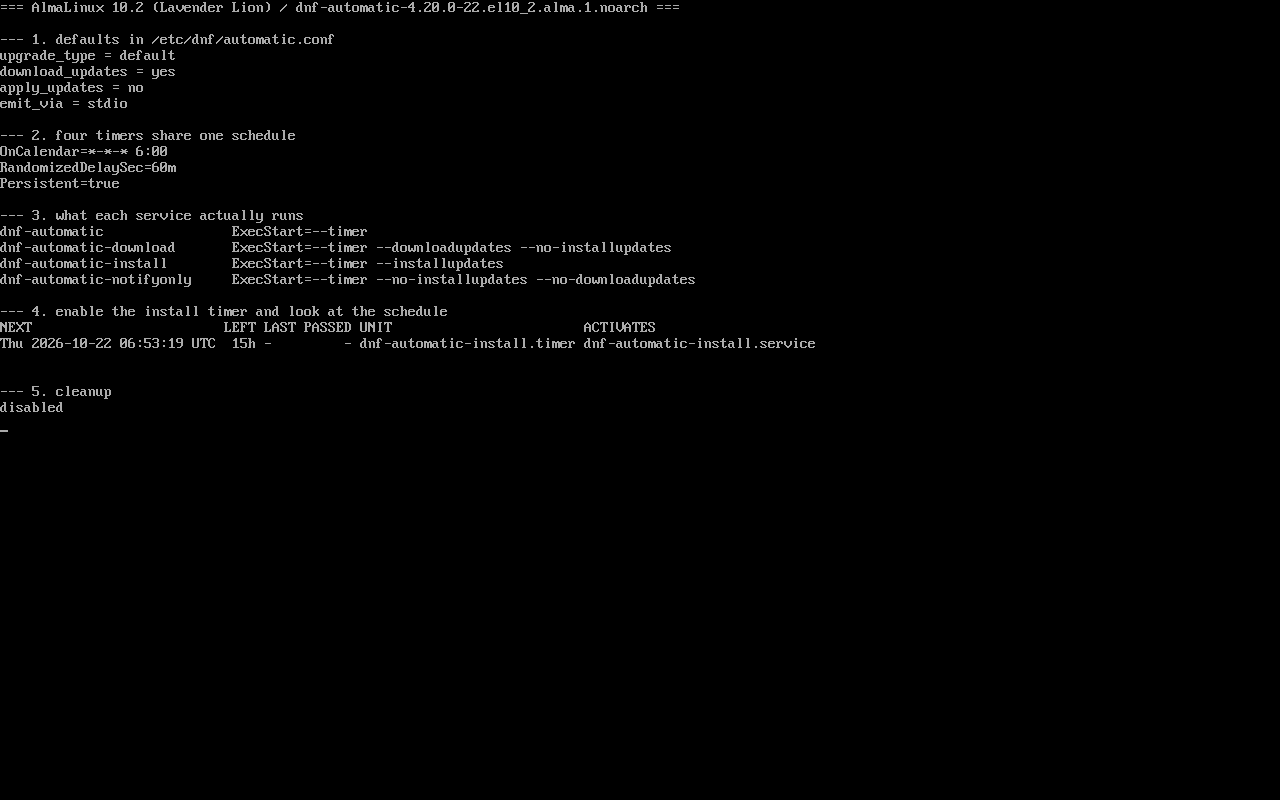
依次核对:配置默认值 → 四个 timer 的时间表 → 四个 service 的实参 → 启用一个 timer 看下次触发 → 关闭。截图:public/evidence/dnf-automatic/alma-timers.png。
配置默认值:下载,但不安装
Section titled “配置默认值:下载,但不安装”$ grep -E "^(apply_updates|download_updates|upgrade_type|emit_via)" /etc/dnf/automatic.confupgrade_type = defaultdownload_updates = yesapply_updates = noemit_via = stdioapply_updates = no 是理解一切的前提:通用 timer 跑完只把包下载到缓存,不安装。很多「配了自动更新却没生效」的根因就在这里。
四个 timer,同一个时间表
Section titled “四个 timer,同一个时间表”$ grep -h -E "^(OnCalendar|RandomizedDelaySec|Persistent)" /usr/lib/systemd/system/dnf-automatic.timerOnCalendar=*-*-* 6:00RandomizedDelaySec=60mPersistent=true四个 timer(dnf-automatic、-download、-install、-notifyonly)的这三行完全一样:
| 项 | 含义 |
|---|---|
OnCalendar=*-*-* 6:00 | 每天 06:00 触发 |
RandomizedDelaySec=60m | 在触发点后 0–60 分钟内随机,避免全网同一秒打镜像站 |
Persistent=true | 关机错过的那次,开机后补跑 |
差别只在 ExecStart
Section titled “差别只在 ExecStart”dnf-automatic --timerdnf-automatic-download --timer --downloadupdates --no-installupdatesdnf-automatic-install --timer --installupdatesdnf-automatic-notifyonly --timer --installupdates --no-downloadupdates- 通用
dnf-automatic.timer:按配置文件走(默认只下载); - download:强制下载、不安装,即使配置里
apply_updates=yes; - install:强制安装,需要下载与仓库都通;
- notifyonly:只发通知,不下载也不安装,适合先观察。
选哪个由你想让机器「自己做什么」决定,而不是哪个名字顺眼。
启用并确认下一次触发
Section titled “启用并确认下一次触发”$ systemctl enable --now dnf-automatic-install.timer$ systemctl list-timers 'dnf-automatic*' --no-pager | head -3NEXT LEFT LAST PASSED UNITThu 2026-10-22 06:53:19 UTC 15h - - dnf-automatic-install.timer dnf-automatic-install.service下次触发是 06:53 而不是 06:00——那就是 60 分钟随机延迟在起作用(本次落在 +53 分)。看到时间不是整点不代表配错了。
改成「仅安全更新」
Section titled “改成「仅安全更新」”# sed -i 's/^upgrade_type = default/upgrade_type = security/' /etc/dnf/automatic.conf# sed -i 's/^apply_updates = no/apply_updates = yes/' /etc/dnf/automatic.conf# systemctl enable --now dnf-automatic-install.timer两个都要改:upgrade_type 决定范围(security / default / minimal),apply_updates 决定是否落地。只改前者,机器仍然只下载。
上线顺序建议 notifyonly → download(观察一段时间)→ install。
想让通知真的发出去:把 MTA 这一段打通
Section titled “想让通知真的发出去:把 MTA 这一段打通”notifyonly 只负责「把结果交给发射器」,邮件能不能出去取决于本机 SMTP,而不是 timer。先看默认值:
$ grep -E "^emit_via" /etc/dnf/automatic.confemit_via = stdiostdio 只写 journal。改成 email 后,配置文件里的 [email] 段才是邮件参数:
email_from = [email protected]email_to = rootemail_host = localhostemail_port = 25email_tls = no这台最小化 Server 上并没有这些东西可用:
$ command -v sendmail(无输出)$ ss -ltn | grep -c ':25 '0要发信就得补 MTA:装 postfix(或任意本地 SMTP),把 email_host 指向真实服务器,email_port 与其监听端口一致;需要认证时 email_tls 要开。
改完不要等第二天 06:00,先手动跑一次验证链路:
$ dnf-automatic /etc/dnf/automatic.conf --timer发不出去时,emit_via = email 不会把错误写到 stdout,只能去 journal 找。
- 只 enable 不 reload:改完配置不需要重启 timer,但要注意 timer 只负责触发,读的是每次运行时的配置;
dnf-automatic.timer与-install.timer同时启用:两套任务各自跑,可能互相抢锁;- 离线机器:
apply_updates=yes也装不上,日志里是仓库不可达; - 日志去哪看:
journalctl -u dnf-automatic-install.service -n 50。
练习:从通知到安装的三步演进
Section titled “练习:从通知到安装的三步演进”sudo dnf install -y dnf-automaticsudo systemctl enable --now dnf-automatic-notifyonly.timersudo systemctl list-timers 'dnf-automatic*' --no-pagersudo systemctl disable --now dnf-automatic-notifyonly.timer检查:
list-timers里能看到下次触发时间(会带随机延迟);systemctl cat dnf-automatic-notifyonly.service的 ExecStart 带--no-downloadupdates;- 换成
-download后同一时间表仍然成立; - 最后关闭,避免实验机自动变更。
常见问题
为什么我的机器没自动装补丁?
先看 apply_updates 是否为 yes,其次看你启用的是哪个 timer(通用/下载/安装/通知),两者都会让「没生效」。
随机延迟能关掉吗?
可以覆盖 timer 的 RandomizedDelaySec,但保留它能避免同一时刻集中请求镜像站。
和 kpatch/重启有什么关系?
dnf-automatic 只负责装包,内核更新是否生效取决于是否重启或是否有 livepatch,二者独立。
- 仓库与包源:/repos/
- 事务回滚:/dnf-history-rollback/
- 重启策略:/reboot-policy/